Agar aap RGPV (Rajiv Gandhi Proudyogiki Vishwavidyalaya) ke student hain aur semester exam dene wale hain, to sabse pehle aapko RGPV Exam Form fill karna hoga.
Har semester hazaron students exam form bharte waqt ABC ID verification, payment issue, ya galat details enter karne jaisi problems ka saamna karte hain. Agar form bharte samay koi mistake ho jaye, to aapka form delay ya reject bhi ho sakta hai.
Is article me hum aapko step-by-step batayenge ki RGPV Exam Form kaise fill karein, ABC ID verify kaise karein, exam fee payment kaise karein, payment fail hone par kya karein aur admit card kaise download karein. Is guide ko follow karke aap bina kisi confusion ke apna exam form successfully submit kar sakte hain.
Documents Required for Filling RGPV Exam Form
- Enrollment Number
- Student Portal Password
- ABC ID (Academic Bank of Credits)
- Registered Mobile Number
- Registered Email ID
- Debit Card / Credit Card / UPI / Net Banking
- Stable Internet Connection
💡 Tip: Exam Form fill karne se pehle upar di gayi sabhi details ready rakhein. Isse form bharte waqt kisi bhi tarah ki problem ya delay nahi hoga.
Step 1: RGPV Student Portal par Login Karein
Sabse pehle RGPV ki official Student Portal website open karein. Login karne ke liye apna Enrollment Number username ke roop me enter karein. Iske baad registration ke samay banaya gaya Password aur Captcha Code bhar kar Sign In button par click karein.
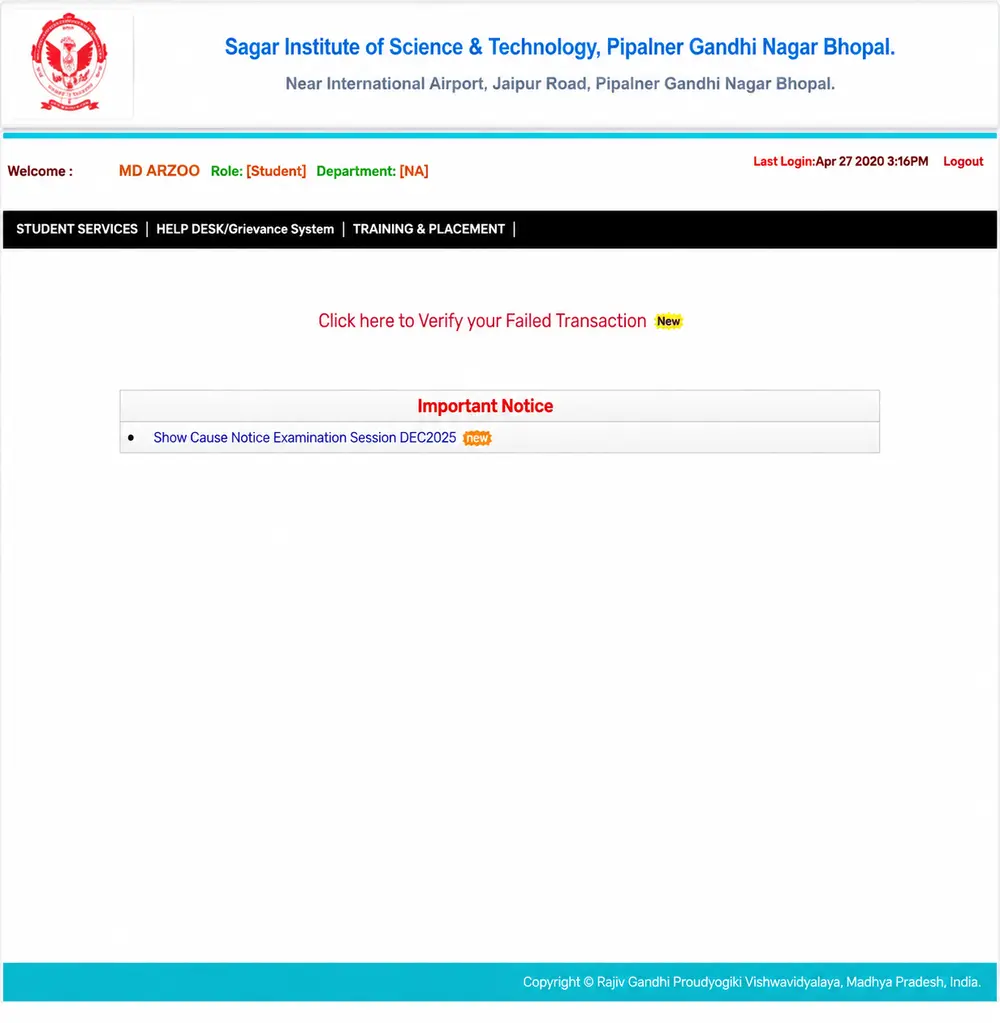
- Official RGPV Student Portal open karein.
- Student Login option par click karein.
- Apna Enrollment Number enter karein.
- Password enter karein.
- Captcha code fill karein.
- Sign In button par click karein.
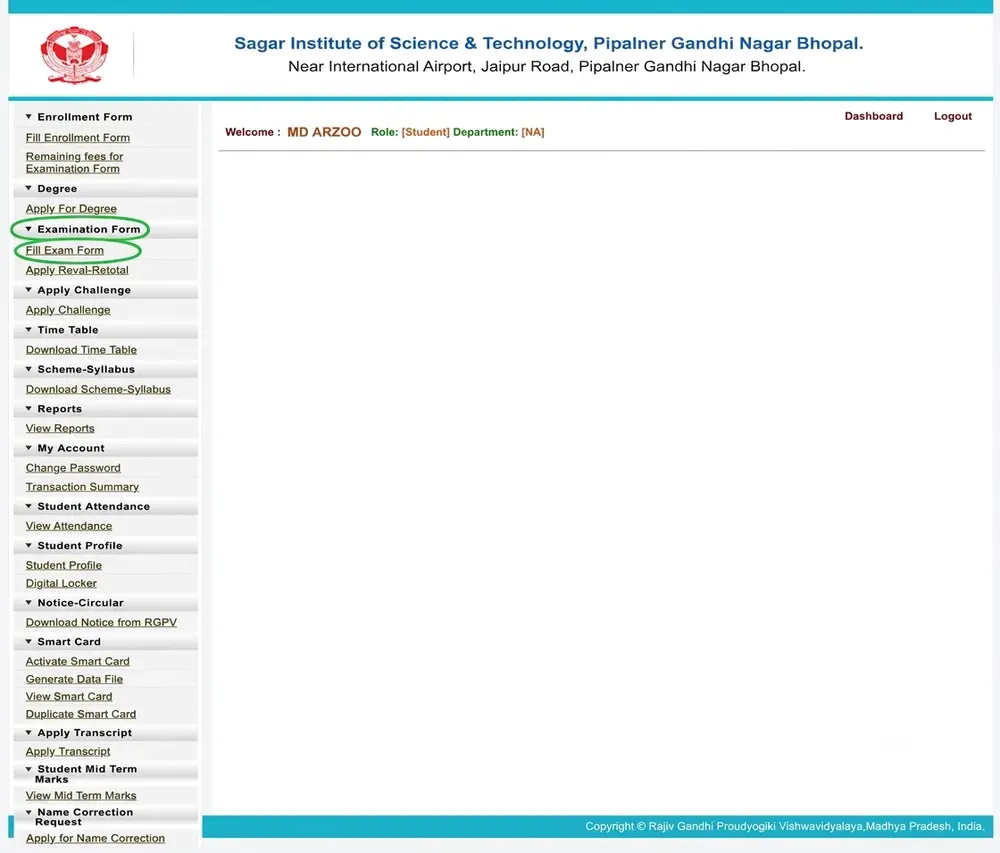
Step 2: Fill Exam Form Option Open Karein
Student Portal me successfully login karne ke baad aapko Dashboard dikhai dega. Ab yahan se Student Services section me jana hoga. Isi section ke andar Fill Exam Form ka option diya hota hai.
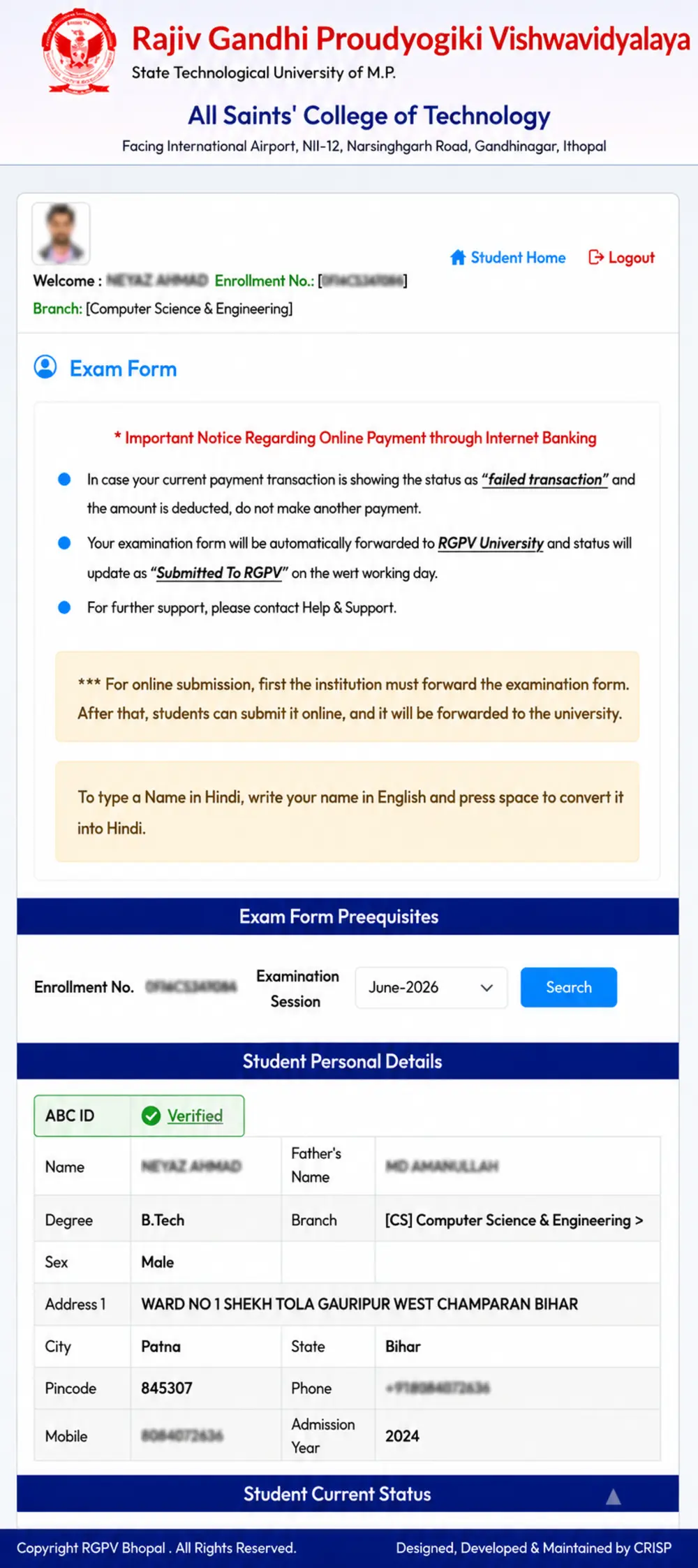
Is option par click karne ke baad aapke saamne Exam Form page open ho jayega. Yahan sabse pehle apna Name aur Enrollment Number check karein. Agar sabhi details sahi hain, to Search button par click karein.
Step 3: ABC ID Verification
Fill exam form button par click karne ke baad kuch students ka Exam Form seedha open ho jata hai kyunki unki ABC ID pehle se verify hoti hai.
Lekin agar aapki ABC ID verify nahi hai, to ghabrane ki zarurat nahi hai. Is situation me portal aapse ABC ID enter karne ke liye kahega.
Apni ABC ID enter karein aur uske baad Verify button par click karein.
Important:
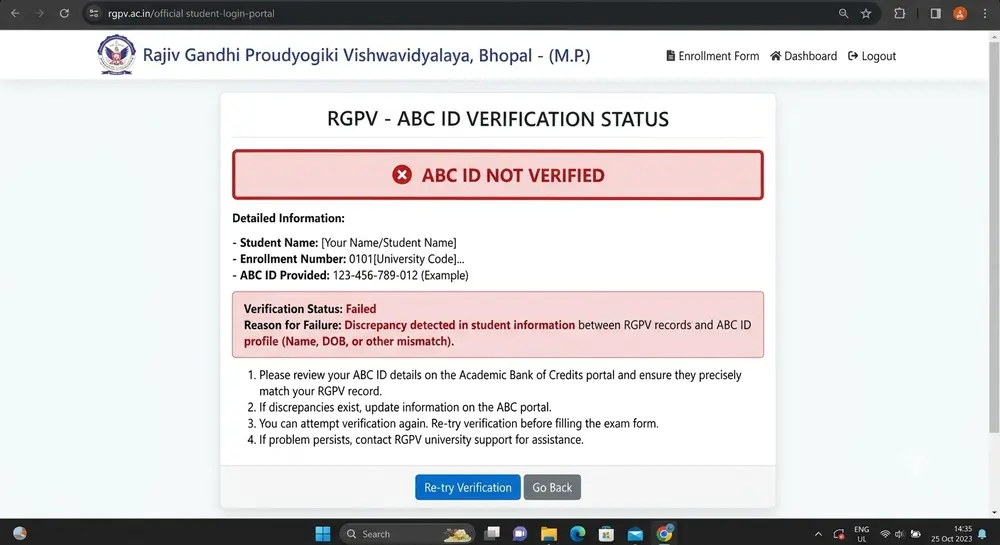
Agar ABC ID verify nahi hoti hai aur “Not Verified” message dikhai deta hai, to bhi kai cases me aap Exam Form successfully fill kar sakte hain. Isliye bina ghabraye agla process continue karein.
Step 4: ABC ID Verify Nahi Ho Rahi? (Name Mismatch Solution)
Bahut se students ki ABC ID sirf isliye verify nahi hoti kyunki Aadhaar Card aur RGPV Portal ki details ek jaisi nahi hoti.
Agar aapke Name, Father’s Name, ya Date of Birth me kisi bhi tarah ka mismatch hai, to portal “Not Verified” status dikha sakta hai.
Agar aapne Aadhaar me recently correction karwaya hai, to sirf Aadhaar update karna kaafi nahi hai. Aapko DigiLocker me login karke apni ABC ID ko bhi update karna hoga. Tabhi verification successful ho sakti hai.
💡 Pro Tip
Agar aapki ABC ID verify nahi hui hai, lekin portal aapko Exam Form submit karne ki permission de raha hai, to Last Date ka wait bilkul mat karein.
Sabse pehle apna Exam Form submit kar dein. ABC ID verification ya naam correction jaise issues baad me bhi solve kiye ja sakte hain. Isse aap exam miss hone ke risk se bach jayenge.
Step 5: College Status Check Karein (Forwarded by Institution)
ABC ID verification ke baad portal par aapko apne Exam Form ka Status check karna hoga.
Yahan generally do tarah ke status dikhai dete hain:
- ✅ Forwarded by Institution
Iska matlab hai ki aapke college ne aapka Exam Form verify karke RGPV ko forward kar diya hai. Ab aap bina kisi problem ke agla process continue kar sakte hain. - ❌ Not Forwarded by Institution
Agar ye status dikhai de, to iska matlab hai ki kisi wajah se aapka form abhi tak college ki taraf se approve nahi hua hai. Aisi situation me turant apne College Exam Cell ya Academic Office se contact karein.
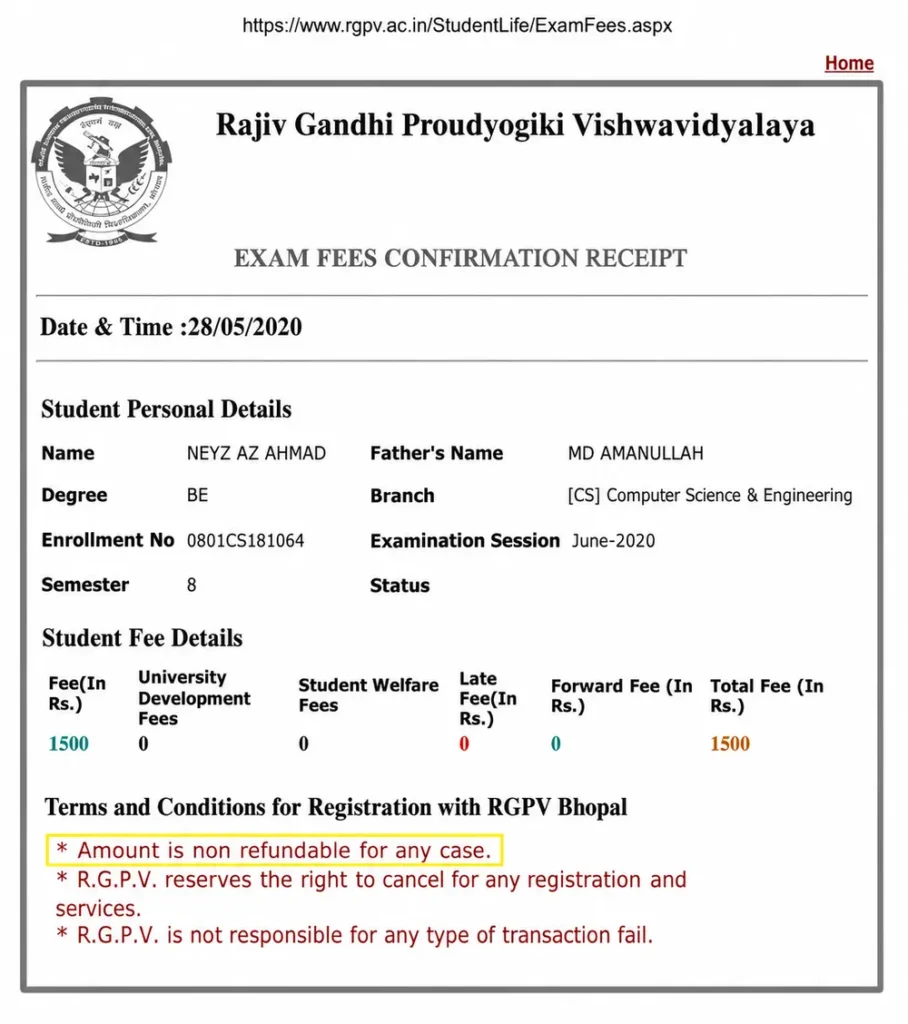
Step 6: Subjects Verify Karein Aur Exam Fee Pay Karein
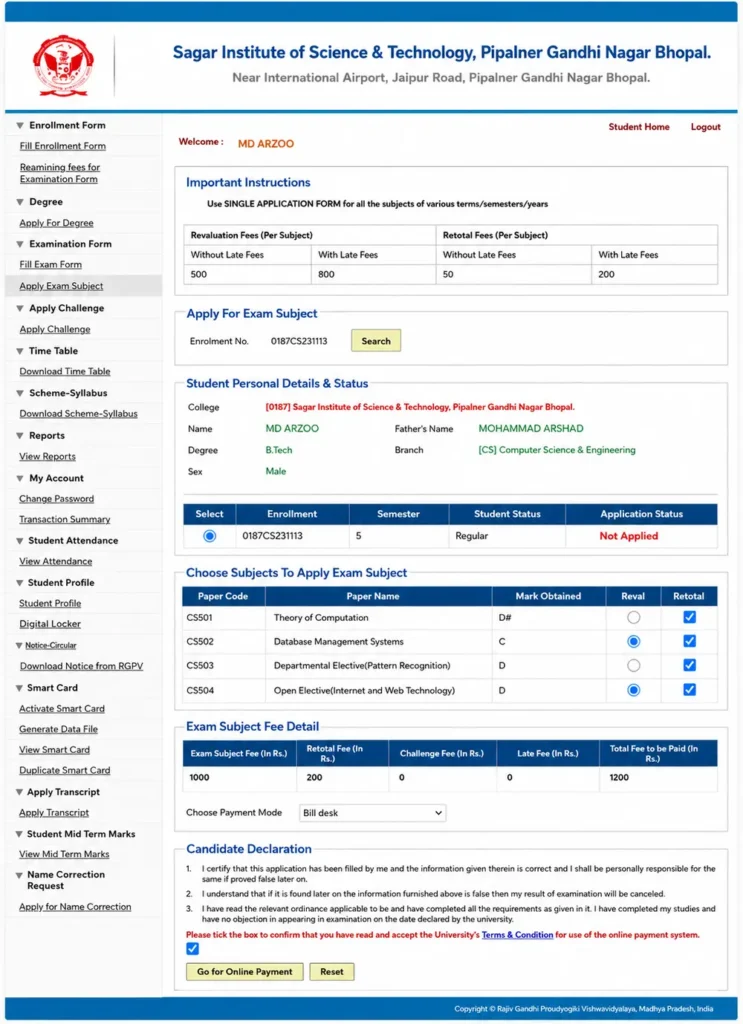
Jaise hi aap Select button par click karenge, aapke semester ke sabhi registered subjects screen par dikhai denge.
Ek baar dhyan se check kar lein ki sabhi subjects sahi hain. Agar koi subject missing ya galat dikh raha hai, to payment karne se pehle apne college se contact karein.
Sab kuch sahi hone ke baad page ko neeche scroll karein.
Ab Terms & Conditions wale checkbox ko tick karein aur Go for Online Payment button par click karein.
RGPV Exam Form Payment Methods
- UPI
- QR Code
- Debit Card
- Credit Card
- Net Banking
Aap apni suvidha ke hisaab se kisi bhi payment method ka use kar sakte hain.
Payment complete hone ke baad Transaction Receipt ko zarur save ya download kar lein. Ye future me payment proof ke roop me kaam aa sakti hai.
@ Important :
Payment successful hone ke baad browser ko turant close mat karein. Sabse pehle ye confirm karein ki transaction successful ho chuka hai aur receipt generate ho gayi hai. Uske baad hi portal se logout karein.
Step 7: Payment ke Baad “Submitted to RGPV” Status Check Kaise Karein?
Exam Fee successfully pay karne ke baad process yahin khatam nahi hota. Bahut se students payment kar dete hain lekin baad me form ka final status check nahi karte.
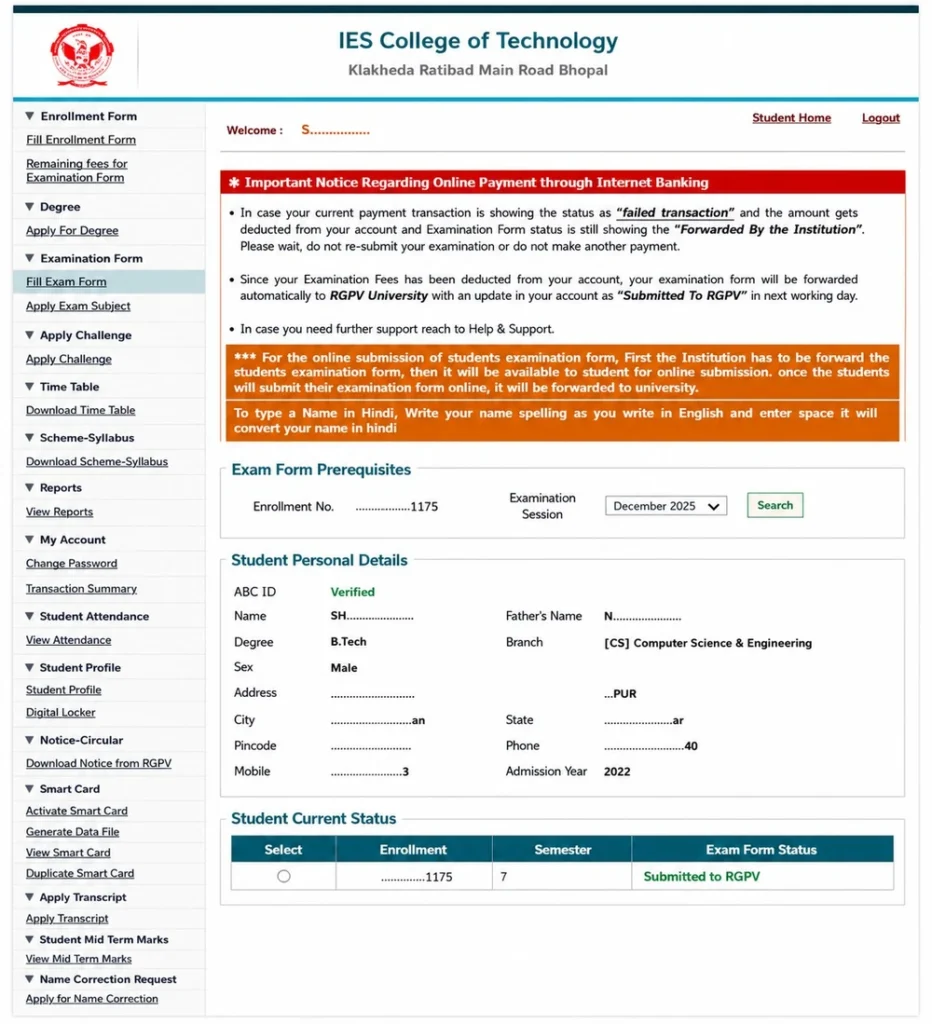
Isliye payment complete hone ke baad dubara Student Portal me login karein aur “Fill Exam Form” section open karke apne form ka status check zarur karein.
- Student Portal par dubara Login karein.
- Student Services open karein.
- Fill Exam Form par click karein.
- Zarurat ho to ABC ID verify karein.
- Apna Form Status check karein.
✅ Success :
Agar aapke portal par “Submitted to RGPV” dikh raha hai, to iska matlab hai ki aapka Exam Form successfully submit ho chuka hai aur RGPV ne usse receive kar liya hai.
Ab aapko sirf Admit Card ka wait karna hai.
Payment Ho Gayi Lekin Status Update Nahi Hua? Kya Karein?
Kabhi-kabhi payment successful hone ke baad bhi portal par “Submitted to RGPV” status turant update nahi hota.
Aisi situation me ghabrane ki zarurat nahi hai. Normally status update hone me 24 se 48 ghante tak ka samay lag sakta hai.
Agar 48 Ghante Baad Bhi Status Update Na Ho To?
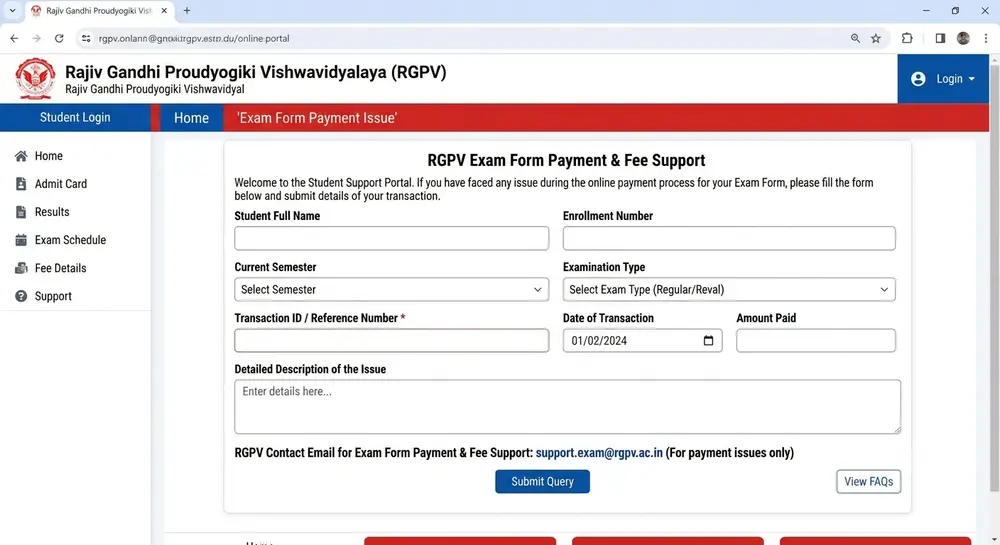
Agar 48 ghante ke baad bhi portal par “Submitted to RGPV” nahi dikh raha hai aur payment successful ho chuki hai, to turant RGPV Support Team ko email karein.
Email me ye details zarur mention karein:
- Student Name
- Enrollment Number
- Branch
- Transaction ID
- Transaction Date
- Payment Method/ Bank Name
- Payment Receipt Screenshot
@ RGPV Support Email :- egov@rgpv.ac.in
Jitni jaldi aap email bhejenge, utni jaldi aapke payment issue ko verify kiya ja sakta hai.
Conclusion about how to fill rgpv exam form
Agar aap is guide me bataye gaye sabhi steps ko dhyan se follow karte hain, to RGPV Exam Form bharne me aapko kisi bhi tarah ki problem nahi hogi.
Form submit karne se pehle apni personal details, subjects aur payment status ko ek baar zarur verify karein.
Agar kisi bhi step me koi dikkat aaye, to niche comment karke puchh sakte hain. Hum aapki madad karne ki poori koshish karenge.
“Ye articles bhi padhein” 👇
Frequently Asked Questions (FAQs) about how to fill rgpv exam form
01. RGPV Exam Form bharne ki last date kaise check karein?
Ans. Official RGPV Portal ya apne college notice board par regularly check karein.
02. ABC ID verify nahi ho rahi hai to kya Exam Form bhar sakte hain?
Ans. Agar portal allow kar raha hai, to Exam Form bhar sakte hain. Verification issue baad me bhi solve ho sakta hai.
03. Exam Fee payment successful hone ke baad kya karein?
Ans. Dubara login karke “Submitted to RGPV” status zarur check karein.
04. Payment ho gayi lekin status update nahi hua?
Ans. 24–48 ghante wait karein. Fir bhi update na ho to RGPV Support ko email karein.
05. RGPV Exam Form bharne ke liye ABC ID zaruri hai?
Ans. Current university guidelines ke hisaab se ABC ID ki requirement ho sakti hai. Agar verification issue aaye to latest instructions aur college guidance follow karein.